Search your bookmarks from anywhere on your Mac and open the right page with a single hotkey-driven flow.
Fastmarks for macOS
Your bookmarks,
faster than tabs.
Fastmarks is a keyboard-driven Mac launcher for searching and opening browser bookmarks from anywhere. Think Spotlight, but nerdier and built for the web.

retina
-
R
ReturnRetina Studioretina.studio
-
T
2TextBuddy Docsretina.studio/textbuddy/help
-
F
3Fastmarks Templatesretina.studio/fastmarks/templates
New tab, generated by Fastmarks
Recent
Frequent
Templates
Docs
Issues
Search
A bookmark launcher for people who stay on the keyboard.
Press your hotkey, type a few letters, choose the bookmark, and press Return. No mouse. No browser sidebar. No rummaging.
Fastmarks is made for people with lots of bookmarks, including bookmarks spread across more than one browser.
Create custom bookmarks without breaking your stride, then keep them available across your Macs with iCloud.
Use Fastmarks as a dynamic home or new tab page with recent bookmarks, frequent bookmarks, and templates.
Search bookmarks like a launcher.
Fastmarks gives saved pages, templates, and frequently opened links one keyboard-first window.
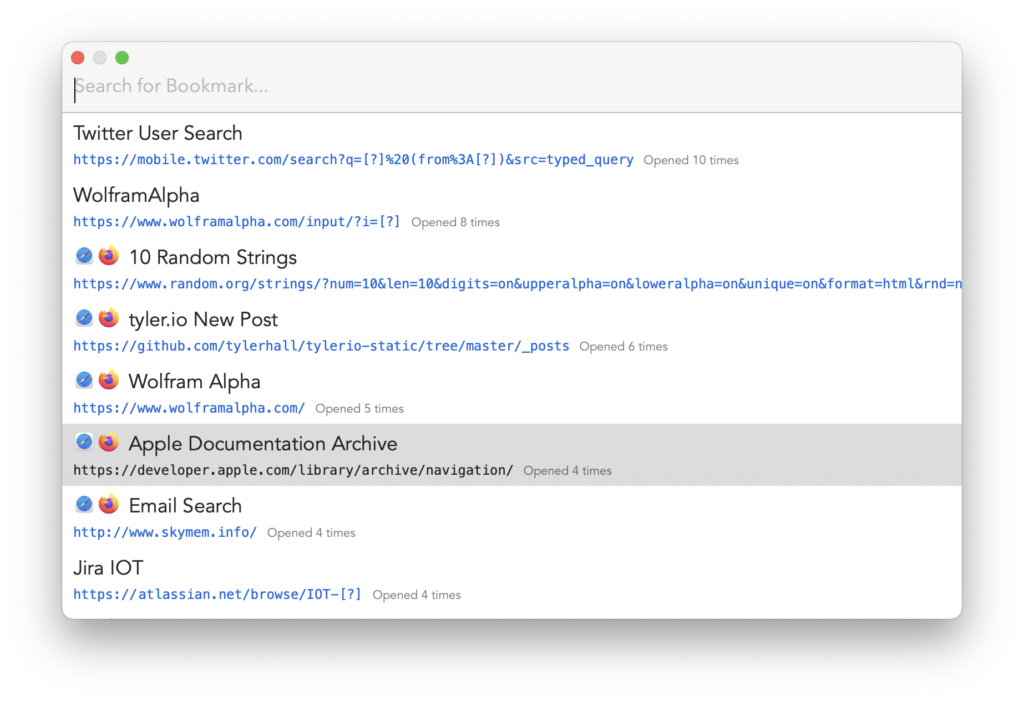
Who it is for
Fastmarks is for bookmark people.
If your browser bookmarks are a carefully tended map of your work, Fastmarks makes that map fast enough to use all day. It is especially useful when the thing you want is saved somewhere, but the mouse path to get there is tedious.
For people who prefer the keyboard
For people with lots of bookmarks
For people who use more than one web browser
16 Second Demo
Open three bookmarks without touching the mouse.
Press your hotkey, type a few letters, choose the bookmark, and hit Return. Fastmarks keeps the whole trip on the keyboard.
Bookmark Templates
Turn one bookmark into a tiny tool.
Templates let you save bookmarks with placeholders. Fastmarks prompts you for the missing value, then opens the finished URL: web searches, Jira tickets, customer orders, docs pages, and anything else with a predictable shape.
https://example.com/orders/{order_number}
order_number: 10492
More than a search box.
The small features around Fastmarks are what make it feel like part of your browser setup.
Search
- Open any bookmark with a hotkey
- Find matches with a few letters
- Jump without browser chrome
Templates
- Create dynamic bookmark URLs
- Fill placeholders on launch
- Save search and work shortcuts
Home Page
- Recent bookmarks
- Frequently opened bookmarks
- Bookmark templates in one place
The fast version of browser memory.
A few concrete workflows Fastmarks is built to make boring, reliable, and quick.
Open three regular work sites without touching the browser UI.
Daily launch rhythm
Type a ticket number and jump straight to the right project page.
Template workflow
Set a new-tab page that reflects what you actually open most.
Browser home base
Make bookmarks feel instant again.
Download Fastmarks for free, then buy a license for one user across multiple Macs when it becomes part of your day.